
Can Home Depot Match Paint From a Chip? How Accurate Is It
Yes — you can get Home Depot to match paint from a chip, and their spectrophotometer plus color‑matching software will usually give you a very close starting color. You should clean and trim a solid, flat chip and bring several lighting samples for best results because dirt, sheen, and aging can skew matches. Matches may need manual tweaks for gloss or complex finishes, and testing samples at home is wise — keep going and you’ll learn when to trust the match and when to get pro help.
Quick Answer: Can Home Depot Match Paint From a Chip?
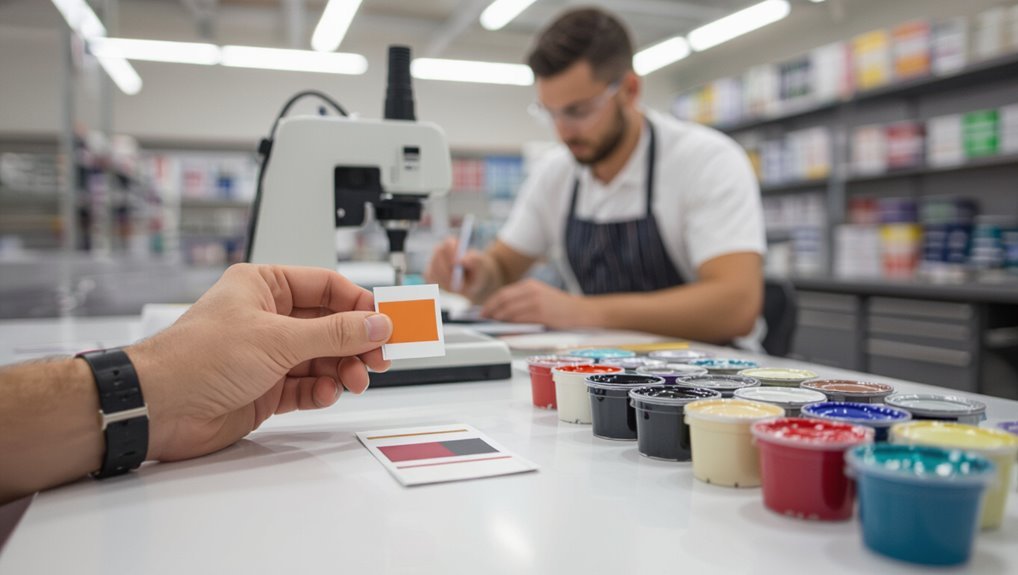
Yes — Home Depot can match paint from a chip. You bring the sample, and technicians scan it to recreate the hue; you’ll see good color consistency for most indoor projects.
Expect reasonable paint durability when you choose quality formulations and follow prep steps. It’s a practical solution if you want a quick, reliable match without custom mixing hassles.
What You Need to Know First About Chip Matching
Before you head to Home Depot, know that successful chip matching depends on the sample quality, lighting, and the paint formula you choose.
Bring a clean, flat chip—good chip preparation matters. Expect variations from monitors and aged surfaces; basic color theory explains undertones and metamerism.
Tell staff about sheen and substrate so they can match pigments appropriately.
How Home Depot Matches a Paint Chip
Bring your clean chip to the paint counter and Home Depot technicians will scan it with a spectrophotometer to analyze the color.
Then use that data plus their color-matching software and tinting system to mix a close formula—staff may also do a visual check and tweak the tint manually for sheen or substrate differences.
You’ll guarantee better color accuracy by proper chip preparation: flat, clean, unstained, and representative.
What the In-Store Color Scanner Actually Reads
When you scan a sample at Home Depot, the device reads only the surface color, not the paint’s formula or texture.
It captures spectral data across wavelengths to create a numerical color profile the counter computer can match.
Keep in mind that the scanner’s reading can be influenced by the lighting and the condition of the chip, so results can vary.
Surface Color Only
Although the scanner reads only the color that hits the sensor, not the paint formula, you should know it’s sampling the surface appearance — pigments, sheen, and any topcoat — rather than the underlying materials or lighting. You’ll need good chip preparation for accurate readings; this affects color consistency.
| Surface | Factor | Impact |
|---|---|---|
| Sheen | Reflectivity | Alters read |
| Topcoat | Gloss | Masks pigment |
| Damage | Dirt/scratches | Skews match |
Spectral Data Capture
Spectral data capture measures how a surface reflects light across many wavelengths, and the scanner converts that reflectance curve into the nearest paint formulation the store can reproduce.
You position the chip, initiate spectral analysis, and the device reads precise reflectance values.
The system then calculates a recipe optimizing color accuracy within the store’s pigment limitations, giving you a reliable starting match.
Influence Of Lighting
Because the scanner only reads the light hitting your paint sample, the store’s match depends as much on the lighting as on the chip itself.
You’ll notice lighting impact instantly: fluorescent, LED, or natural light shifts readings.
Bring your sample in the room’s lighting or request scans under multiple lights. That helps guarantee accurate color perception and a closer match to your wall.
How Chip Age, Dirt, and Fading Affect Matches
When you bring in a paint chip, keep in mind that age, surface dirt, and sun exposure all change how the color reads.
So an older or grimy sample may not represent the original hue. You should check chip condition and chip texture; environmental factors drive aging effects and fading effects, while dirt impact alters color stability.
Clean, recent samples guarantee better color consistency.
How Lighting and Room Conditions Change Perceived Color
If you view a paint sample under different lighting or in varying room conditions, you’ll often see the color shift noticeably; warm incandescent bulbs bring out yellows and reds, cool LEDs emphasize blues, and natural daylight shows the truest balance.
You should test chips at different times and angles, because color perception changes with lighting effects, room reflections, wall finish, and nearby furnishings.
How Different Paint Brands Affect Match Results
Although many stores promise an exact color match, different paint brands use unique pigments, bases, and formulas that can produce subtle but noticeable variations.
So you should expect slight differences even from a machine-matched sample. When you do a brand comparison, check sheen, pigment load, and base chemistry.
That helps you judge color consistency and decide if touch-ups or blending are needed.
Which Home Depot Paint Lines Give the Best Matches
Knowing how brand chemistry alters a machine match helps you pick the best Home Depot line for your job.
You’ll usually get excellent paint quality from premium lines like Behr Marquee and some PPG offerings; they handle subtle color variations better.
For budget projects, expect more variance and occasional touch-ups.
Always test a small sample under your lighting before committing.
Does Sheen Change the Perceived Color?
You’ll notice sheen can change how a color reads because shinier finishes reflect more light and seem brighter. That light reflection alters perceived depth and can make tones look warmer or cooler depending on the angle.
Also consider how surface texture interacts with sheen—rough surfaces scatter light and soften color, while smooth ones amplify it.
Sheen Affects Color Perception
Because sheen changes how light reflects off a surface, it can make the same paint appear lighter, darker, or even subtly different in hue depending on whether you choose flat, satin, or gloss.
You’ll notice the sheen impact immediately: higher gloss boosts contrast and sharpness, altering your color perception.
Test chips in your room, since finish choice changes the final look.
Light Reflection And Depth
While sheen doesn’t change a paint’s pigment, it does alter how light reflects and how deep a color looks, so you’ll often perceive the same hue differently on glossy versus matte surfaces. You’ll notice color perception shifts with gloss, affecting visual contrast and perceived depth.
| Sheen | Effect |
|---|---|
| Matte | Softer, flatter |
| Eggshell | Mild depth |
| Satin | Subtle glow |
| Gloss | Bright, pronounced |
Surface Texture Interaction
Surface texture plays a big role in how a paint color reads—rough, porous surfaces scatter light and soften highlights, while smooth, hard surfaces reflect more directly and boost brightness.
When Associates Manually Tweak a Scanned Match
When a scanned color doesn’t quite match your sample, associates will manually tweak the digital readout to get a closer match, adjusting hue, tint, or saturation based on what they see and your needs.
You can ask for manual adjustments to improve color accuracy, request visual comparisons under store lighting, and get small test pots to confirm the adjusted formula before committing.
Primers, Surface Texture, and Their Effect on Color
If you ask associates to tweak a scanned match, remember that what you see on the wall will still depend on primer choice and wall texture.
You should consider primer types, substrate interaction, and texture effects because paint absorption changes color depth.
Different surface finish and roughness alter light reflection, so a matched tint may read lighter or deeper depending on paint absorption and the final surface finish.
How to Prepare and Bring a Paint Chip for Best Results
When you bring a paint chip to Home Depot, make sure it’s clean and free of dust or paint smudges so the scanner reads the true color.
Include chips taken from different spots under the same light and one photographed in natural daylight to show how the color shifts.
That way the associate has multiple lighting samples to match the paint more accurately.
Choose A Clean Chip
Want the most accurate match? Choose a clean chip: remove dirt, grease, or loose paint before you go.
Good chip preparation matters. Bring a solid piece with intact edges and no brush marks.
Follow these steps:
- Wash gently.
- Dry fully.
- Trim to solid color.
- Protect from bending.
Clean surfaces guarantee the scanner reads true color.
Include Multiple Lighting Samples
Why bring more than one chip? You should include samples from different rooms and times to show lighting conditions and environmental factors that affect color perception.
Proper chip preparation—clean, flat pieces—helps technicians compare paint variations accurately. Multiple samples improve matching techniques by revealing undertones and how colors shift, so the match suits real-world conditions, not just one snapshot.
How to Test a Matched Sample at Home
Start by preparing a small, concealed area and apply the matched paint exactly as you’ll on the wall—same roller or brush, same number of coats—so you can see how it behaves in real conditions.
Test the match on a small, hidden patch using the same tools and coats to see real-world results.
Use sample testing and DIY techniques to assess color, sheen, and coverage.
- View in daylight
- View under artificial light
- Let fully dry
- Inspect from distance
Common Reasons a Match Looks Off and Quick Fixes
Although a lab match gets you close, there are a few common reasons the color can still look off once it’s on your wall, and most are easy to fix.
Check lighting shifts, sheen differences, and primer vs. base color. Your color perception changes with surroundings; adjust with small tint tweaks.
Ask for alternative matching techniques or remix samples before full application.
When to Hire Professional Color-Matching Services
If you’re working with a tricky color — vintage paint, metallics, or an exact match for a restored piece — it’s worth bringing in professional color-matching services.
You should hire pros when you need precision, rely on color theory, or lack equipment.
Consider professional services for:
- Historic restorations
- Complex finishes
- Large visible areas
- Matching under varied lighting
Cost, Turnaround Time, and Home Depot Policies
You’ll want to compare the cost breakdown for color-matching services, mixing fees, and any tint or sample charges so you know what you’re paying for.
Expect typical turnaround times of a few hours to a day for in-store matches, while custom mixes or large orders can take longer.
Also check Home Depot’s policies on returns, guarantees, and repeat matches before you commit.
Cost Breakdown
When you’re comparing paint-matching options at Home Depot, cost matters beyond just the price per can—expect a mix of fixed fees for color matching and variable costs for custom tints, plus potential charges for specialty finishes or samples.
You should weigh paint quality, color consistency, budget considerations, project planning, paint selection, labor costs, tool expenses, and sample sizes.
- Matching fee
- Tinting per ounce
- Specialty finish surcharge
- Sample/test pot cost
Turnaround Times
Turnaround times at Home Depot vary by service and location, so check with your store for exact estimates before planning a project. You’ll usually get quicker turnaround for tint-only mixes; custom blends take longer. Expect variability based on store workload and policies; ask about turnaround efficiency to meet your customer expectations.
| Service | Typical Time |
|---|---|
| Tint-only | Same day |
| Custom mix | 1–3 days |
| Large orders | 3–7 days |
| Reorders | 1–2 days |
Customer Experiences: Typical Tolerance and Real Outcomes
Although color matching technology has improved a lot, subtle differences between sample and mixed paint still happen, and you’ll usually notice them only in certain lights or next to adjacent colors.
Even with better color-matching tech, subtle shifts still appear—often only in certain light or beside other colors.
Your customer feedback often praises quick service but notes small shifts in matching accuracy.
Typical outcomes you’ll see:
- Close match
- Slight tint
- Visible mismatch
- Needs tweak
Decision Checklist: Trust Home Depot or Take Extra Steps
If you want consistent results without surprises, weigh practical factors before deciding whether to trust Home Depot’s match or take extra steps.
Check trust factors: chip size, lighting, sheen, and store equipment.
Consider accuracy concerns like batch variation and aging.
If color sensitivity matters, get a proof swatch, request a fresh tint, or consult a professional for spectrophotometer verification.
Frequently Asked Questions
Can Home Depot Match Metallic or Pearlescent Paints?
Yes — but you’ll face limits: Home Depot can attempt metallic paint matching, yet metallic paint matching and pearlescent paint accuracy vary; you’ll likely need multiple samples and adjustments to achieve the desired shimmer and color shift.
Will Matched Paint Be Colorfast Outdoors Over Time?
Yes — matched paint can be colorfast outdoors, but its color longevity and outdoor performance depend on formula, UV resistance, pigment quality, and proper surface prep; you’ll want topcoat protection and periodic maintenance for best long-term results.
Can They Match Paint From Wallpaper or Fabric Samples?
Metaphorically speaking, yes—you can get color matching from wallpaper or fabric, but expect sample limitations: stains, texture, and backing can skew results, so you’ll likely need larger, clean swatches for the best match.
Do They Offer Guarantees if the Match Fades or Peels?
Yes — you’ll get a guarantee on paint quality through their return and manufacturer warranties, and they’ll address peeling or fading; you’ll want to keep receipts to confirm color consistency and prompt resolution under those warranty terms.
Can I Return Unused Matched Paint for a Refund?
Yes—you can return unused matched paint for a refund. Picture a receipt cradling the can; follow Home Depot’s paint return policy and paint refund process, bring your unopened can and receipt within their return timeframe.
Conclusion
Yes — Home Depot can match paint from a chip, but don’t expect perfection every time. When you bring a chip, the in-store scanner reads the top surface color and converts it to a closest formula, so age, dirt, gloss, and fading can throw it off. For critical matches, get a fresh, clean sample or consider a professional spectrophotometer service. Weigh cost and turnaround: for walls, Home Depot’s usually fine; for furniture or trim, test a small sample first.
